Market backdrop
…Each value carries its own source date. A market regime is context, not a forecast.
FOR SELF-DIRECTED US SWING TRADERS
Turn a watchlist into a working plan. See what needs attention, inspect your entry, stop and targets, and keep the whole trade in view.
01Find your focusA ranked watchlist with a reason.
02Prepare the tradeLevels and context, together.
03Close the loopA journal that keeps the lesson.
REAL PRODUCT PROOF
Explore DELL with the product’s current market data, chart tools and decision context. Then inspect the product screens and authentic Telegram delivery.
DELL · US equitiesNo account needed. No orders placed.
Loading the latest available product data…
TODAY + THE WEEK BEHIND IT
Price, rank, volume and recent changes belong together. Open the plan to inspect the structure behind the numbers.
…Completed daily close … · …
……
WHY IT SURFACED
…
The quote follows the available feed. Entry, stop and targets follow the completed daily analysis.
… Proximity to a level is context for your decision.
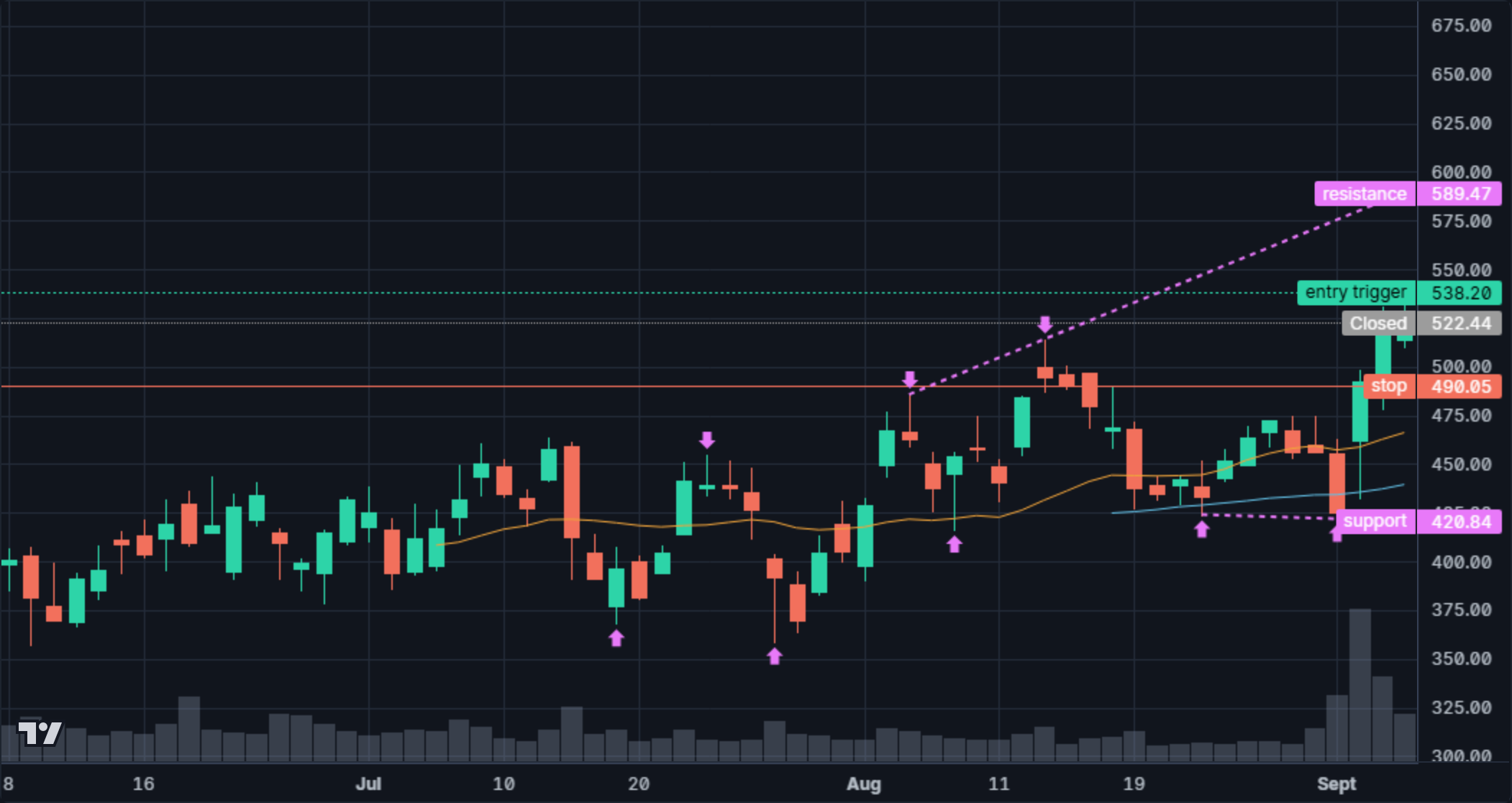
THE ACTUAL PRODUCT CHART
Four timeframes. Nine chart layers. Explore the same price, volume and relative-strength tools used in the member desk.
Each layer explains its purpose. Availability follows the selected timeframe and data.
Drag sideways to pan · + / − or pinch to zoom · arrow keys inspect bars
TradingView Lightweight Charts™ · © 2025 TradingView, Inc.
Daily plan through … · Targets outside the visible chart range remain listed above.
For this page visit only. Does not change the plan or place an order.
The quote can move during the session. The plan is calculated from completed daily bars. Changing the chart timeframe does not recalculate the daily plan.
…
… The stop uses the tighter of the structure and volatility references. It does not place an order or guarantee an exit price.
… The first and second targets are 1R and 2R above entry. A structure target, when available, is shown separately.
Source timestamps stay visible. Delayed quotes, overdue daily data, and connection failures are marked. Fetching an old quote never makes it “live.”
Intraday frames include completed pre-market and after-hours bars. Layers that do not apply explain why.
…
THE PICTURE AROUND THE TRADE
Read the market regime, sector comparisons, economic releases, earnings, news and ownership together.
Each value carries its own source date. A market regime is context, not a forecast.
Percentage-point return difference vs SPY · …
…
Quarterly holdings, daily comparisons and the latest quote are labelled separately. Missing results remain visible.
CLOSE THE LOOP
Try a full or partial exit, inspect the result in R, then grade the process. The calculation uses the product’s journal math.
The initial example uses the current plan. Your edits stay intact during market refreshes.
The starting example exits at the stop. It demonstrates a loss and the discipline of reviewing it. None of these fills were executed.
Current market context from the product feed. Chart and journal calculations from the product. Personal annotations and review edits are temporary.
A WATCHLIST WITH PRIORITIES
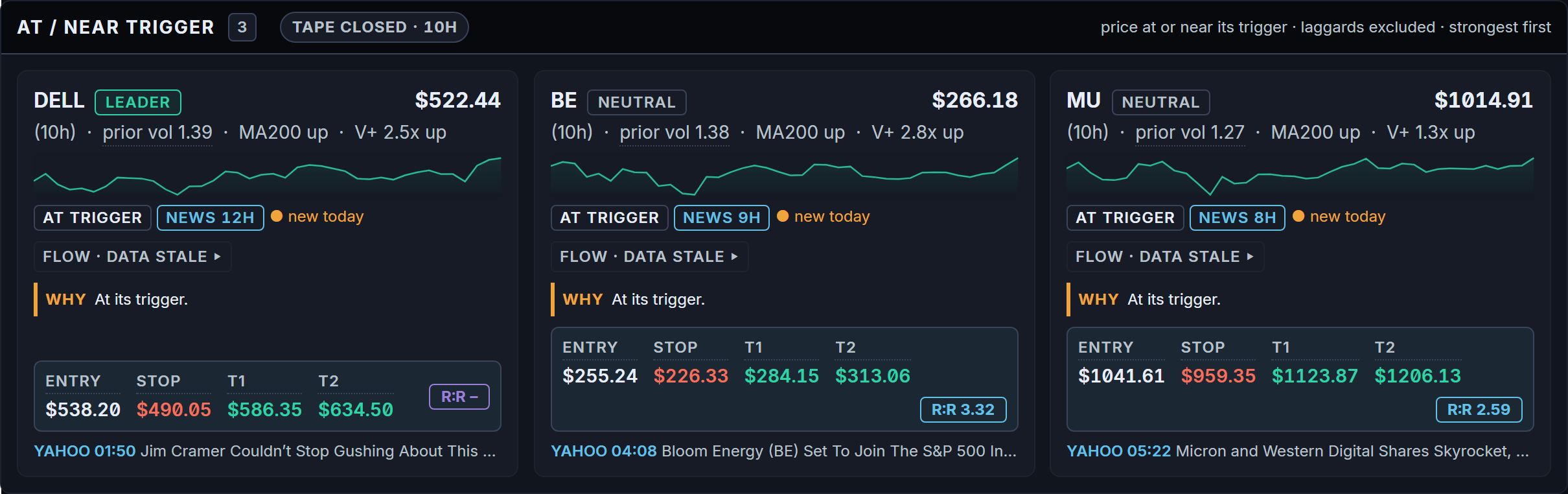
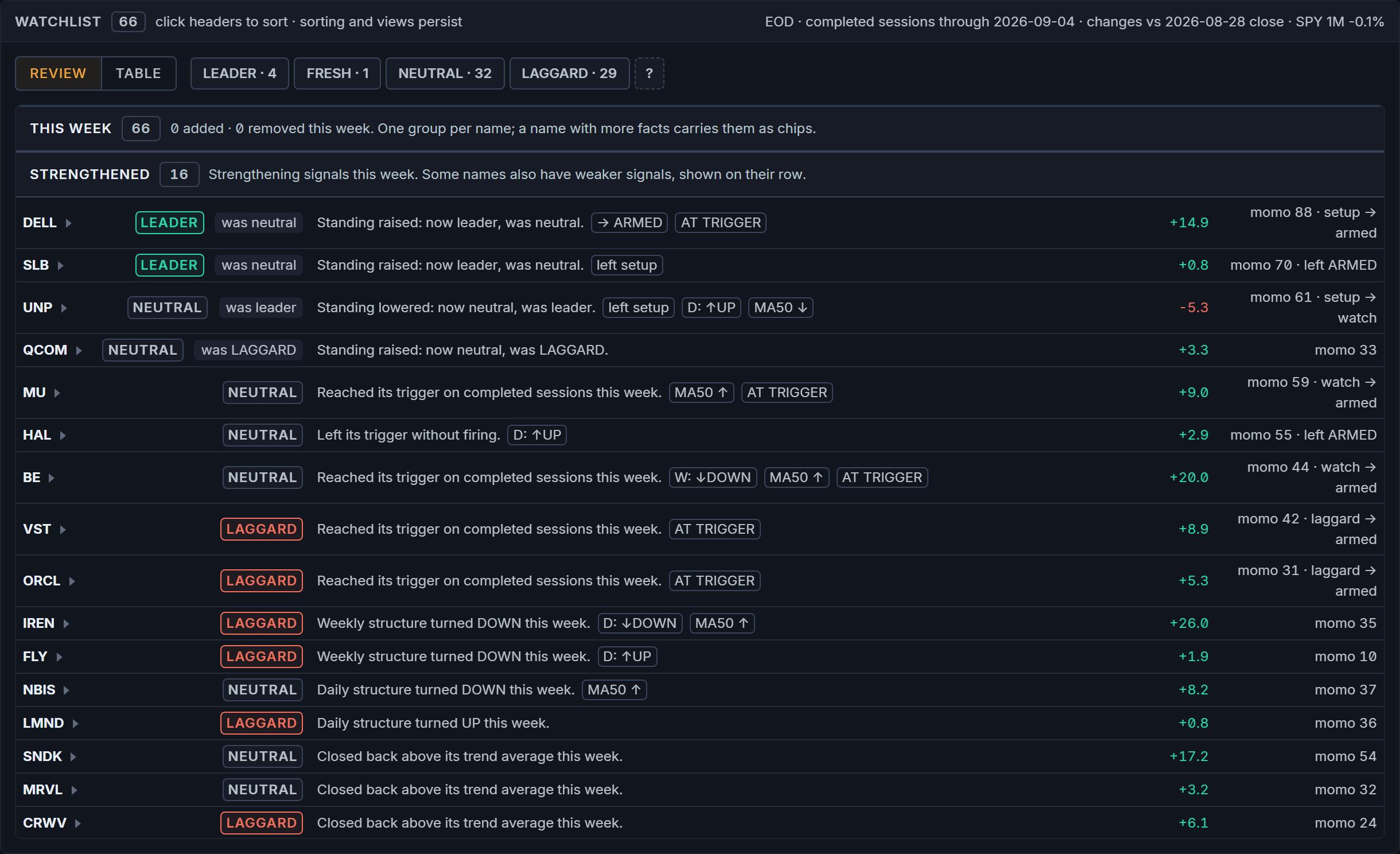
Start with the names at or near their trigger. See why each one surfaced, then use the weekly view to understand what changed.
This capture could not load.
Understand the priorityTrigger status and the reason sit on each card.
Keep the plan nearbyEntry, stop and both targets travel with the name.
This capture could not load.
See what changedStrengthened, deteriorated and approaching names are grouped for review.
Keep the wider listThe factor table gives you the detail behind the summary.
Move from a list of symbols to a shortlist you can investigate.
LEVELS IN CONTEXT
Open a name and inspect the entry trigger, protective stop and both targets against the chart. The structure behind the plan stays visible.

This capture could not load.
See the structureEntry and stop are visible against the price history.
Keep the referenceThe plan row puts all four levels in one place.
Review the setup and its risk before deciding whether it belongs in your process.
THE PICTURE AROUND THE TRADE
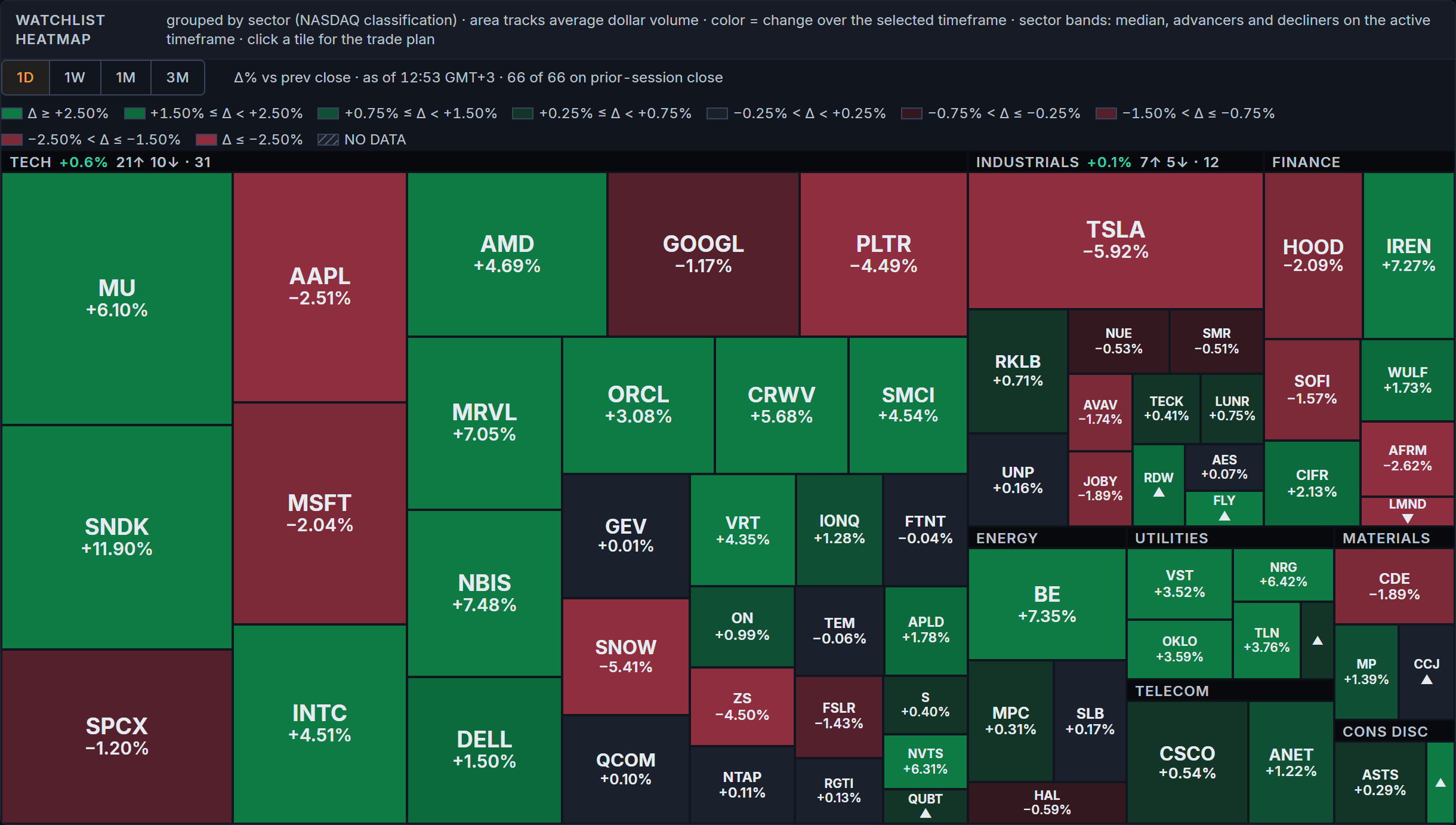
Check the event calendar and sector picture alongside the setup. Scheduled releases use one Eastern Time clock; the heatmap reflects your watchlist.

This capture could not load.
One clock to followRead release times in ET alongside the event status.
Compare the resultActual, consensus and prior appear together. Missing data is marked.
This capture could not load.
Read the groupSee which sectors contain the watchlist’s leaders and laggards.
Keep the context relevantThe map follows your watchlist, not the entire market.
Bring timing and market context into the same decision as the chart.
FROM THE DESK TO YOUR PHONE
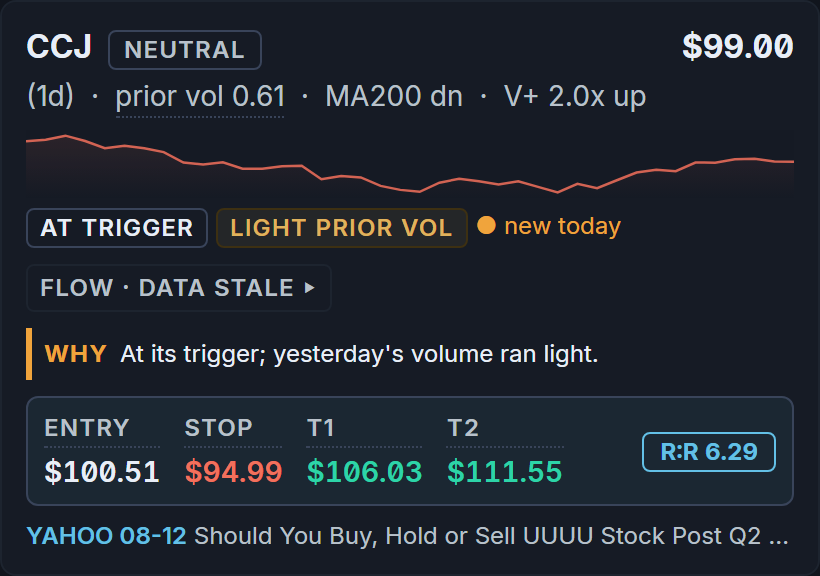
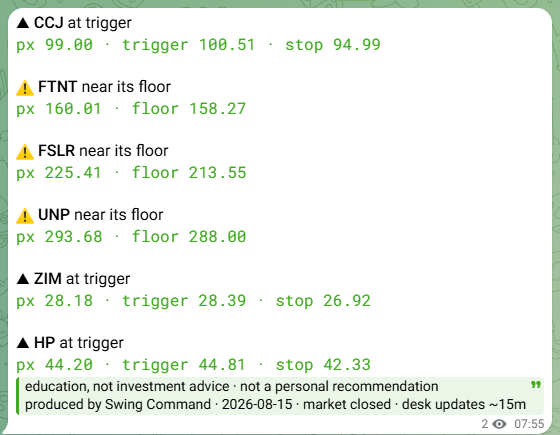
DESK adds a curated Telegram channel. This delivered Today briefing shows how a watchlist name and its levels arrive beside the matching desk plan.
This capture could not load.
The same reference levelsMatch the briefing’s trigger and stop to the desk card.
A curated channelDESK follows the desk’s watchlist; it is not a personal alert builder.
Keep the desk’s context close when you step away from the screen.
MAKE THE LESSON PART OF THE RECORD
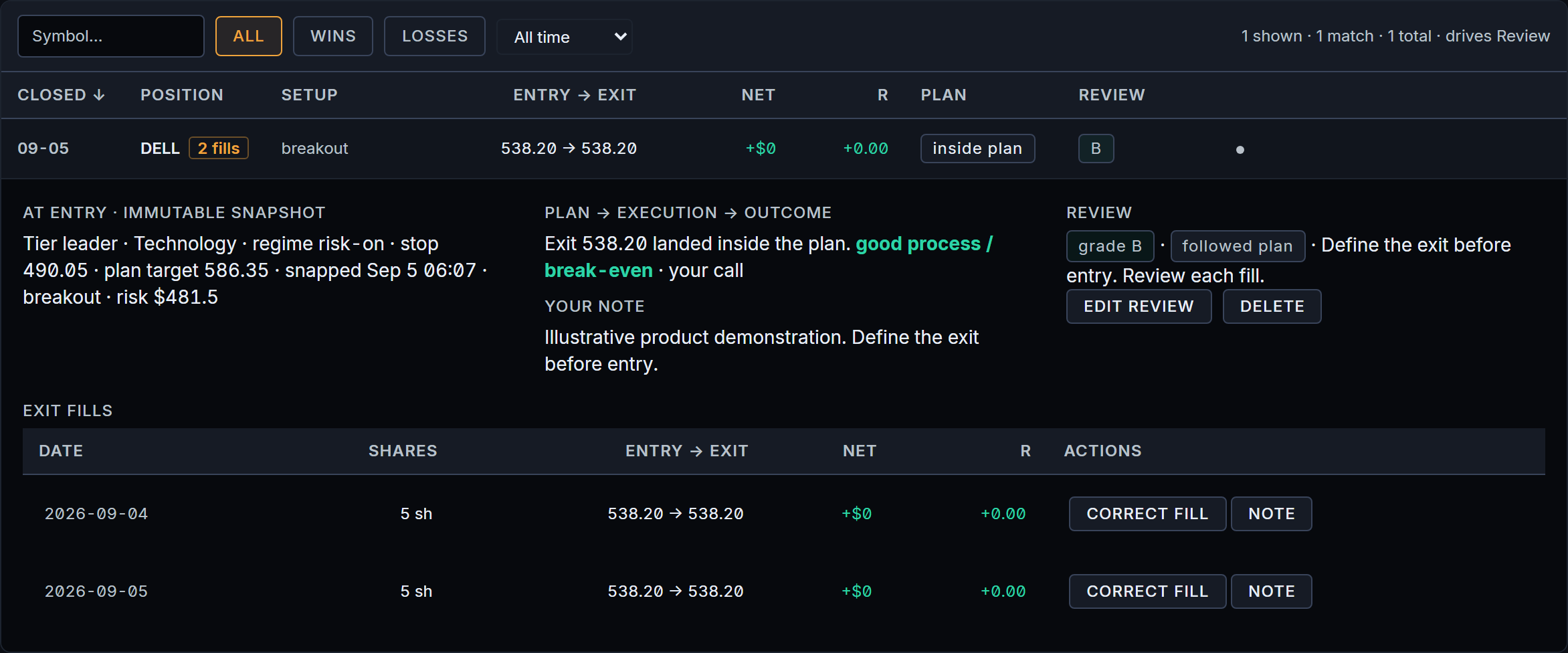
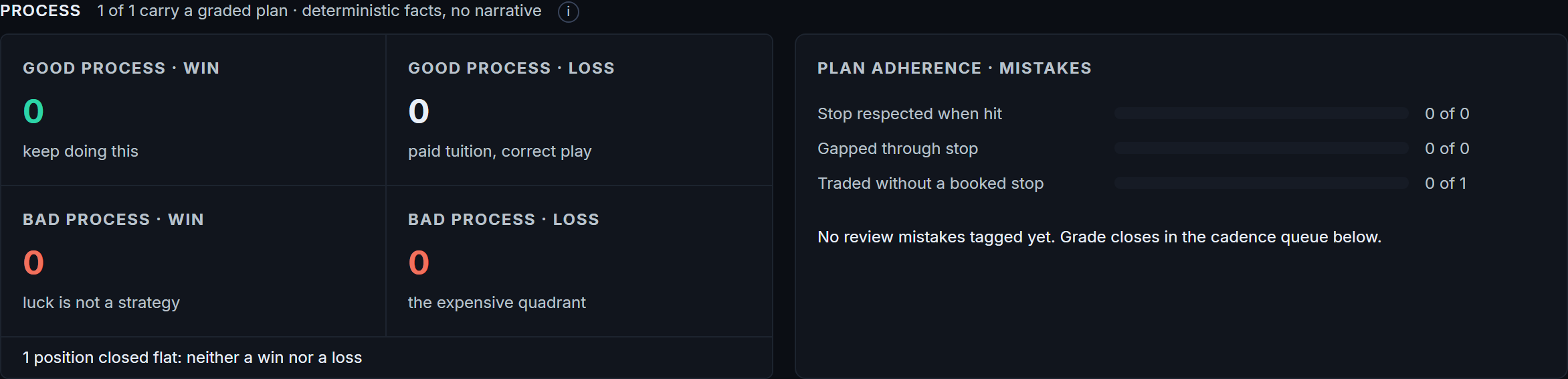
Log the trade, record full or partial exits, and return to the plan. Grade the process and save what you want to carry into the next decision.
This capture could not load.
Keep the full recordThe entry snapshot, exit fills and review stay together.
Write the lessonGrade the process and record whether you followed the plan.
This capture could not load.
Look beyond the outcomeReview plan adherence and mistakes alongside the recorded result.
Work from your recordsThe review reflects the trades you log yourself.
Build a review habit around what you did, why you did it, and what you learned.
Actual product captures. Journal records are illustrative. Screens are snapshots, not live market data.
THE COMPLETE WORKFLOW · 48 SECONDS
From a ranked name to the lesson you keep. Watch how the pieces work together. Product screens show the workflow; illustrative trade and alert examples are labeled.
01 · Focus02 · Plan03 · Context04 · Review
Analysis and alerting only. No broker connection, order routing, position sizing or performance promise.
WHY SWINGCOMMAND EXISTS
Every evening, swing traders repeat the same work across screeners, charts, earnings calendars, alerts and notes. The trigger is in one place, the levels in another, the context somewhere else — and the reason for the trade often stays in your head.
SwingCommand brings that work into one continuous desk: rank what deserves attention, open the plan with entry, stop and targets already drawn, see the event and sector context, follow the desk’s Telegram updates, then return the trade to the journal and review the process.
LESS TOOL-SWITCHINGLESS RECONSTRUCTIONONE PROCESS FROM PREPARATION TO REVIEW
PRICING
PLAN THE DAY
$59 / month
After the first 100 paid subscriptions: $99 / month · $990 / year.
Checkout opening soonNothing is collected yet.
PLAN + MONITOR
$99 / month
After the first 100 paid subscriptions: $179 / month · $1,790 / year.
Everything in TERMINAL, plus the desk’s curated Telegram channel.
Checkout opening soonNothing is collected yet.
Both plans include the complete dashboard. DESK adds delivery to your phone.
| What you get | TERMINAL | DESK |
|---|---|---|
| Ranked watchlist & chart plansExplore the sample | Included | Included |
| Events & watchlist heatmapInspect the screens | Included | Included |
| Journal & process reviewTry a review | Included | Included |
| Curated Telegram channelSee a DESK message | Not included | Included |
DESK delivery: five alert shapes · 4-hour repeat throttle · overnight quiet window. A tracked position pressing its stop always gets through. Everyone receives the same curated stream.
Launch pricing is capacity-based: the first 100 paid subscriptions lock their launch price for as long as the subscription stays active. The standard price applies only after the cohort fills.
A command center, deliberately narrow. What we do not do:
No. Alerts report what happened on the desk's curated watchlist: a trigger crossed, a floor approached, a tracked position pressing its stop. They never say what to do. SwingCommand computes levels and context; it never sizes a position, never touches a broker, and never promises a result. If you want someone to trade for you, this is the wrong product.
Five views over your own watchlist: TODAY, WEEK, EVENTS, HEATMAP, JOURNAL. The screening universe, the regime read and the news wire are running before you log in. Charts carry 9 layers across four timeframes; the factor board runs 13 columns by default, 19 in full view.
Every level is drawn from completed daily bars, never a moving intraday guess. Each chart arrives with the entry trigger, the protective stop and both targets already placed. Live quotes refresh every 5 seconds while the market is open; everything else refreshes every 15 minutes through the session and rebuilds after the close. Anything not current is marked.
Few. Everyone on DESK receives the same stream: one situation is one message, repeats are suppressed by a 4-hour throttle, and an overnight quiet window holds the rest. A tracked position pressing its stop always gets through.
Any modern browser. It installs as an app on desktop and phone, and the whole surface is keyboard-operable.
Two plans, paid from day one. Launch pricing for the first 100 paid subscriptions: TERMINAL at $59 a month or $590 a year, DESK at $99 a month or $990 a year. After the first 100, TERMINAL is $99 a month or $990 a year and DESK is $179 a month or $1,790 a year. Your launch rate holds while your subscription stays active. You are charged only at checkout, and within 30 days of your first payment the Refund control in your account sends it back to the card you paid with; if that control is unavailable, one email to support@swingcommand.com from your account address does the same.
30-day money-back on the first payment · no broker connection